Blender 4.2 メニューを自作したときの備忘録
operator_enum, operator_menu_enumの引数
UILayout(bpy_struct) - Blender Python APIから:
operator_enum(operator, property, icon_only=False)
operator_enum

Parameters:
    operator (string, (never None)) – Identifier of the operator
    property (string, (never None)) – Identifier of property in operator
    icon_only (boolean, (optional)) – Draw only icons in buttons, no text
operator_menu_enum(operator, property, text='', text_ctxt='', translate=True, icon='NONE')
operator_menu_enum

Parameters:
    operator (string, (never None)) – Identifier of the operator
    property (string, (never None)) – Identifier of property in operator
    text (string, (optional)) – Override automatic text of the item
    text_ctxt (string, (optional)) – Override automatic translation context of the given text
    translate (boolean, (optional)) – Translate the given text, when UI translation is enabled
    icon (enum in Icon Items, (optional)) – Icon, Override automatic icon of the item

Returns: Operator properties to fill in

Return type: OperatorProperties
第1引数 operator と第2引数 property になにを設定したらいいのかわからなくて悩みました。
~~~
例えば座標系(グローバル、ローカルなど)を変更するメニュー項目を追加したいときは、
bpy.ops.transform.select_orientation(orientation='GLOBAL')
(Transform Operators - Blender Python APIより)が該当オペレーターなので、"bpy.ops."の後ろの部分"transform.select_orientation"と引数のキーワード"orientation"を文字列で指定すればいいようです。
layout.operator_enum("transform.select_orientation", "orientation")
もしくは
layout.operator_menu_enum("transform.select_orientation", "orientation")
です。
ピボットポイントの変更
"transform pivot"のキーワードでAPI検索するとオペレーターは見つけられなくて、ToolSettingsのメンバーのtransform_pivot_pointを見つけました。
transform_pivot_point
Pivot center for rotation/scaling

    BOUNDING_BOX_CENTER Bounding Box Center – Pivot around bounding box center of selected object(s).
    CURSOR 3D Cursor – Pivot around the 3D cursor.
    INDIVIDUAL_ORIGINS Individual Origins – Pivot around each object’s own origin.
    MEDIAN_POINT Median Point – Pivot around the median point of selected objects.
    ACTIVE_ELEMENT Active Element – Pivot around active object.

Type:
    enum in [‘BOUNDING_BOX_CENTER’, ‘CURSOR’, ‘INDIVIDUAL_ORIGINS’, ‘MEDIAN_POINT’, ‘ACTIVE_ELEMENT’], default ‘MEDIAN_POINT’
(ToolSettings(bpy_struct) - Blender Python APIより。)ToolSettingsはクラス定義で、値を設定する実体はbpy.context.tool_settings.transform_pivot_pointでした。
オペレーターを作る
Blender本体のPythonスクリプトから、4.2/scripts/startup/bl_operators/mesh.pyで定義されているMeshMirrorUVクラスを参考にしました。
# Copyright 2024 kurousa (chrono_x_usagi)

# This program is free software: you can redistribute it and/or modify it
# under the terms of the GNU General Public License as published by
# the Free Software Foundation, either version 3 of the License,
# or (at your option) any later version.

# This program is distributed in the hope that it will be useful,
# but WITHOUT ANY WARRANTY; without even the implied warranty of
# MERCHANTABILITY or FITNESS FOR A PARTICULAR PURPOSE. See
# the GNU General Public License for more details.

# You should have received a copy of the GNU General Public License
# along with this program. If not, see https://www.gnu.org/licenses/.

import bpy
from bpy.types import Operator
from bpy.props import EnumProperty


class KUROUSAGI_OT_transform_pivot(Operator):
    """Tooltip"""
    bl_idname = "kurousagi.transform_pivot"
    bl_label = "ピボットポイント"

    point: EnumProperty(
        name = "Transform Pivot Point",
        items = (
            # 3番目の要素がなんなのかわからないけど、"" ではだめみたい
            ('BOUNDING_BOX_CENTER', "Bounding Box Center", 'PIVOT_BOUNDBOX'),
            ('CURSOR', "Cursor", 'PIVOT_CURSOR'),
            ('INDIVIDUAL_ORIGINS', "Individual Origins", 'PIVOT_INDIVIDUAL'),
            ('MEDIAN_POINT', "Median Point", 'PIVOT_MEDIAN'),
            ('ACTIVE_ELEMENT', "Active Element", 'PIVOT_ACTIVE'),
        ),
    )

    def execute(self, context):
        context.tool_settings.transform_pivot_point = self.point
        # self.report(
        #     {'INFO'},
        #     f"{self.point}"
        # )
        return {'FINISHED'}


_classes = (
    KUROUSAGI_OT_transform_pivot,
)


def register():
    for cls in _classes:
        bpy.utils.register_class(cls)


def unregister():
    for cls in _classes:
        bpy.utils.unregister_class(cls)
メニューに組み込む
layout.operator_menu_enum(
    KUROUSAGI_OT_transform_pivot.bl_idname,
    "point"  #  EnumPropertyの変数名
)
ウェイトペイントのブラシのブレンドモード
API Reference Usage - Blender Python API の中に
# Access the number of samples for the Cycles render engine.
bpy.context.scene.cycles.samples

# Access to the current weight paint brush size.
bpy.context.tool_settings.weight_paint.brush.size

# Check if the window is full-screen.
bpy.context.window.screen.show_fullscreen
を見つけ、これとBrush(ID) - Blender Python APIのblendの内容から
context.tool_settings.weight_paint.brush.blendに値を設定するオペレーターを作りました。
# Copyright 2024 kurousa (chrono_x_usagi)

# This program is free software: you can redistribute it and/or modify it
# under the terms of the GNU General Public License as published by
# the Free Software Foundation, either version 3 of the License,
# or (at your option) any later version.

# This program is distributed in the hope that it will be useful,
# but WITHOUT ANY WARRANTY; without even the implied warranty of
# MERCHANTABILITY or FITNESS FOR A PARTICULAR PURPOSE. See
# the GNU General Public License for more details.

# You should have received a copy of the GNU General Public License
# along with this program. If not, see https://www.gnu.org/licenses/.

import bpy
from bpy.types import Operator
from bpy.props import EnumProperty


class KUROUSAGI_OT_brush_blend(Operator):
    """Tooltip"""
    bl_idname = "kurousagi.brush_blend"
    bl_label = "ブラシのブレンドモード"

    blend: EnumProperty(
        name = "Brush Blending Mode",
        items = (
            ('MIX',         "Mix",          "Mix"),
            ('ADD',         "Add",          "Add"),
            ('SUB',         "Sub",          "Sub"),
            ('MUL',         "Multiply",     "Multiply"),
            ('LIGHTEN',     "Lighten",      "Lighten"),
            ('DARKEN',      "Darken",       "Darken"),
            ('COLORBURN',   "Color Burn",   "Color Burn"),
            ('LINEARBURN',  "Linear Burn",  "Linear Burn"),
            ('SCREEN',      "Screen",       "Screen"),
            ('COLORDODGE',  "Color Dodge",  "Color Dodge"),
            ('OVERLAY',     "Overlay",      "Overlay"),
            ('SOFTLIGHT',   "Soft Light",   "Soft Light"),
            ('HARDLIGHT',   "Hard Light",   "Hard Light"),
            ('VIVIDLIGHT',  "Vivid Light",  "Vivid Light"),
            ('LINEARLIGHT', "Linear Light", "Linear Light"),
            ('PINLIGHT',    "Pin Light",    "Pin Light"),
            ('DIFFERENCE',  "Difference",   "Difference"),
            ('EXCLUSION',   "Exclusion",    "Exclusion"),
            ('HUE',         "Hue",          "Hue"),
            ('SATURATION',  "Saturation",   "Saturation"),
            ('LUMINOSITY',  "明度",          "Luminosity"),
            ('COLOR',       "Color",        "Color"),
            ('ERASE_ALPHA', "Erase Alpha",  "Erase Alpha"),
            ('ADD_ALPHA',   "Add Alpha",    "Add Alpha"),
        )
    )

    def execute(self, context):
        context.tool_settings.weight_paint.brush.blend = self.blend
        # self.report(
        #     {'INFO'},
        #     f"ブラシのブレンドモード:{self.blend}"
        # )
        return {'FINISHED'}


_classes = (
    KUROUSAGI_OT_brush_blend,
)


def register():
    for cls in _classes:
        bpy.utils.register_class(cls)


def unregister():
    for cls in _classes:
        bpy.utils.unregister_class(cls)
メニューへの組み込みはピボットポイントと同じです。
layout.operator_menu_enum(
    KUROUSAGI_OT_brush_blend.bl_idname,
    "blend"  #  EnumPropertyの変数名
)
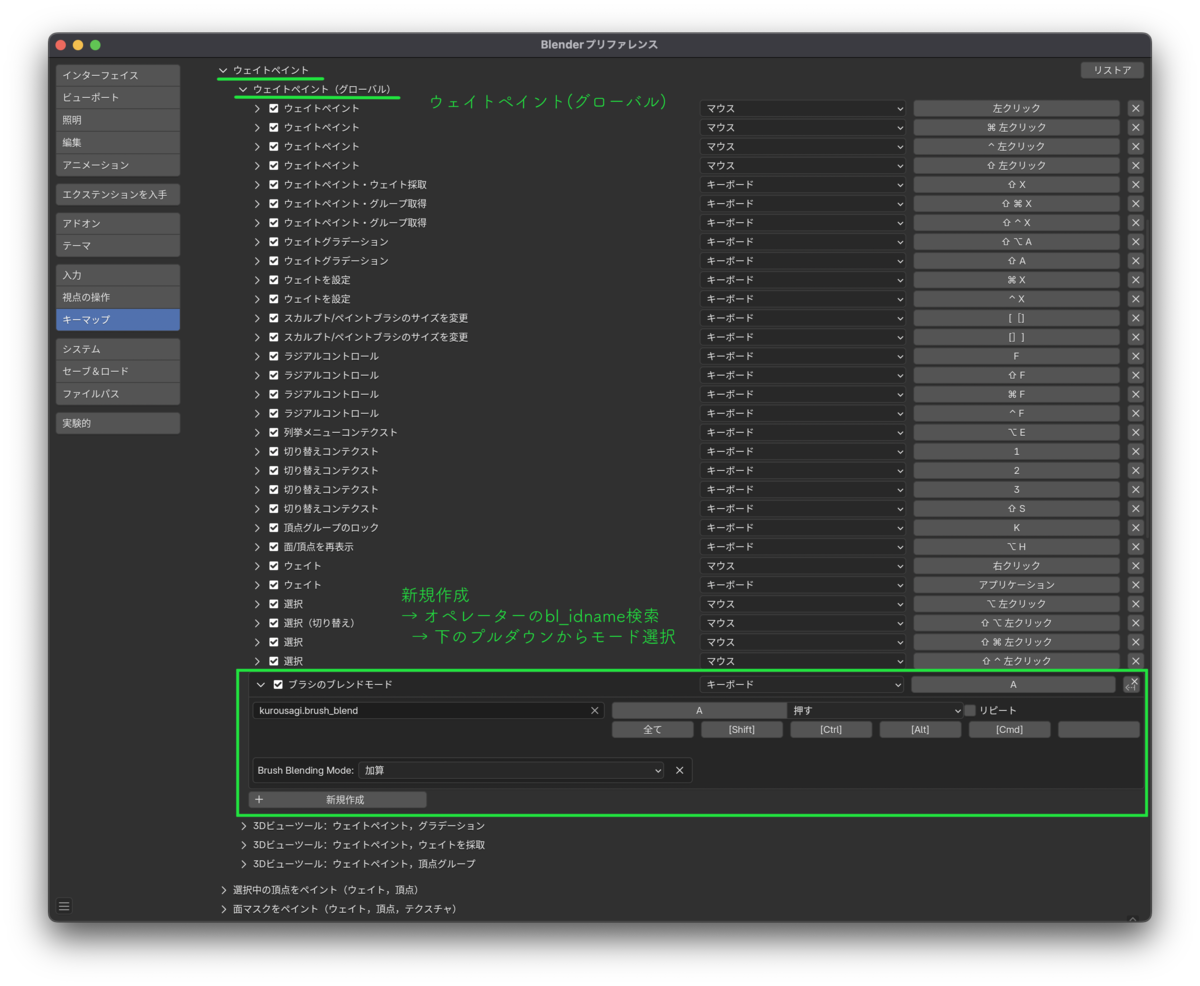
このオペレーター単体でもbl_infoをつけてアドオンにすれば、ショートカットキーの割り当てもできるようです。
bl_info については忘却野さんの記事に記述があります。【Blender】アドオンの作り方・構造の解説【サンプルコードあり / 初心者向け】 – 忘却まとめ